| Audience | Marketers and data teams configuring AID agents |
| Prerequisites |
|
The user feature matrix (UFM) defines the customer attributes and behavioral signals AID uses to evaluate each user individually and determine which message, offer, or channel is most likely to drive your desired outcome.
Overview
The user feature matrix (UFM) is a structured set of customer attributes and behavioral features used by AI Decisioning (AID) to evaluate what is most likely to drive a desired outcome for each individual user.
The UFM is built from data in your data warehouse and made available to AID through your Hightouch schema. It stays in your warehouse — secure, governed, and under your control.
Key concepts
- Features are customer attributes and behaviors that help predict which actions drive your goals.
- High-signal features typically span behavioral history, customer value, demographics, preferences, and current context.
- More features are better than fewer. AID's models learn which ones matter and discard those that don't.
- Start with the data you have and enrich over time.
Why the UFM matters
Without a UFM, AID treats users in broad segments — "high-value customers," "recent purchasers," or "email engagers." With a well-built UFM, AID can make decisions at the individual user level instead.
AID uses UFM features to:
- Understand individual context by considering how multiple features interact (for example, recent behavior, lifecycle stage, and preferences).
- Identify patterns that predict outcomes by learning which feature combinations are most likely to drive goals like clicks, purchases, or conversions.
- Continuously improve decisions as new outcomes are observed and incorporated into future predictions.
- Make per-user decisions at scale without manual segmentation or rules.
Build a feature matrix
The Feature Matrix Builder is a self-serve interface that lets you create and manage UFMs directly in the Hightouch UI without writing SQL. Work with your Strategy Consultant and Machine Learning Engineer to get enabled, then build and iterate on your feature matrices yourself. If you have custom SQL features defined in a related model or the parent model, you can still reference them through the builder.
Before you start, confirm that:
- The parent model for the agent you're building this matrix for is already configured in your Hightouch Schema.
- The related models or event models you want to use as features are available in your Schema. If they aren't set up yet, work with your Hightouch team and internal data owner to add them first.
Step 1: Create a feature matrix
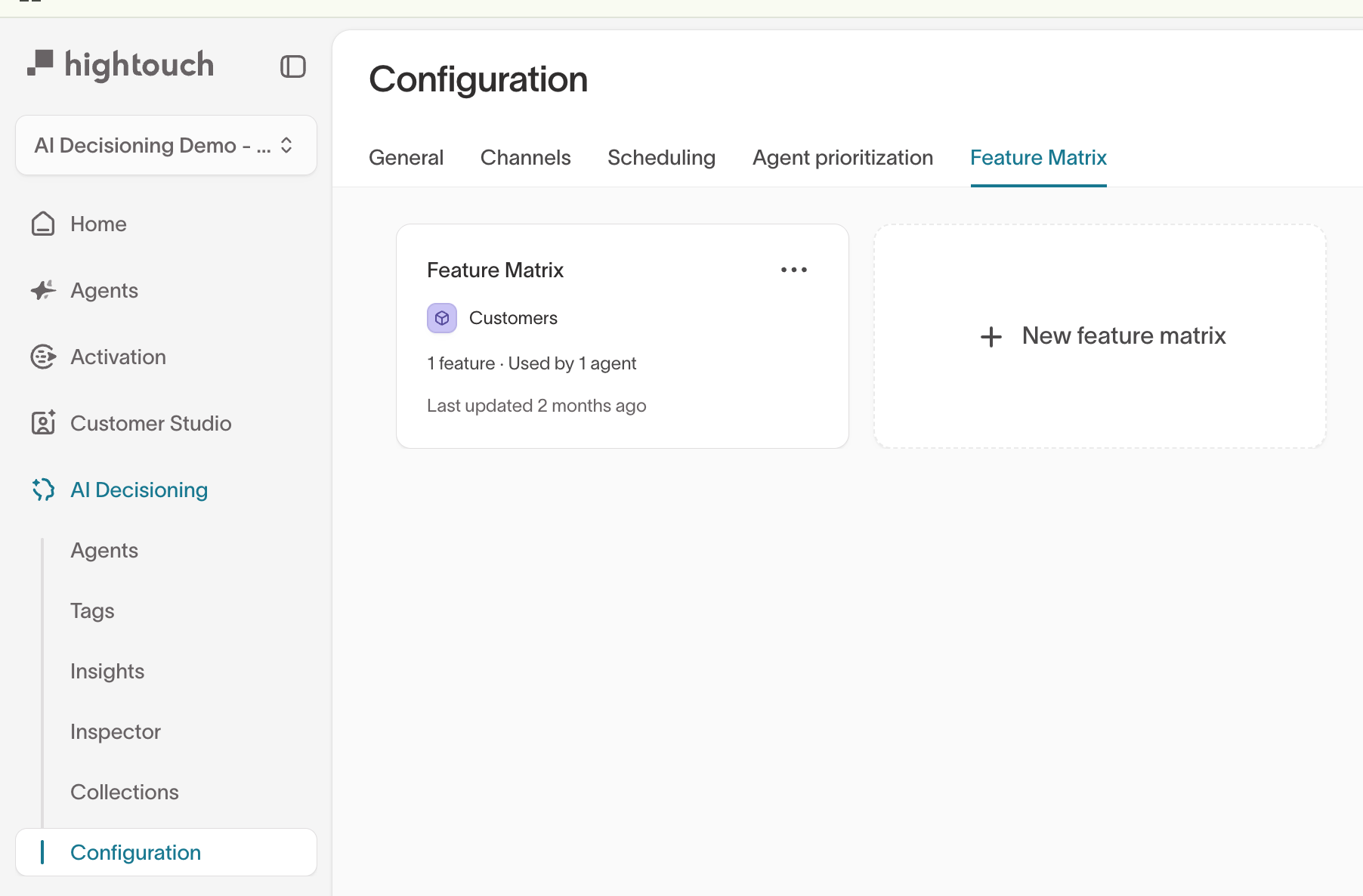
Go to AI Decisioning > Configuration > Feature Matrix and select New feature matrix. Name it and select the parent model this matrix will use. The matrix must match the parent model of the agents you assign it to.
Step 2: Select and configure features
Use the model sidebar to navigate between your parent model and related data sources.
- Parent model and one-to-one related model columns are direct user attributes that require no aggregation.
- Event models and one-to-many related models have multiple rows per user and require aggregation. Configure the aggregation type and time window for each column.
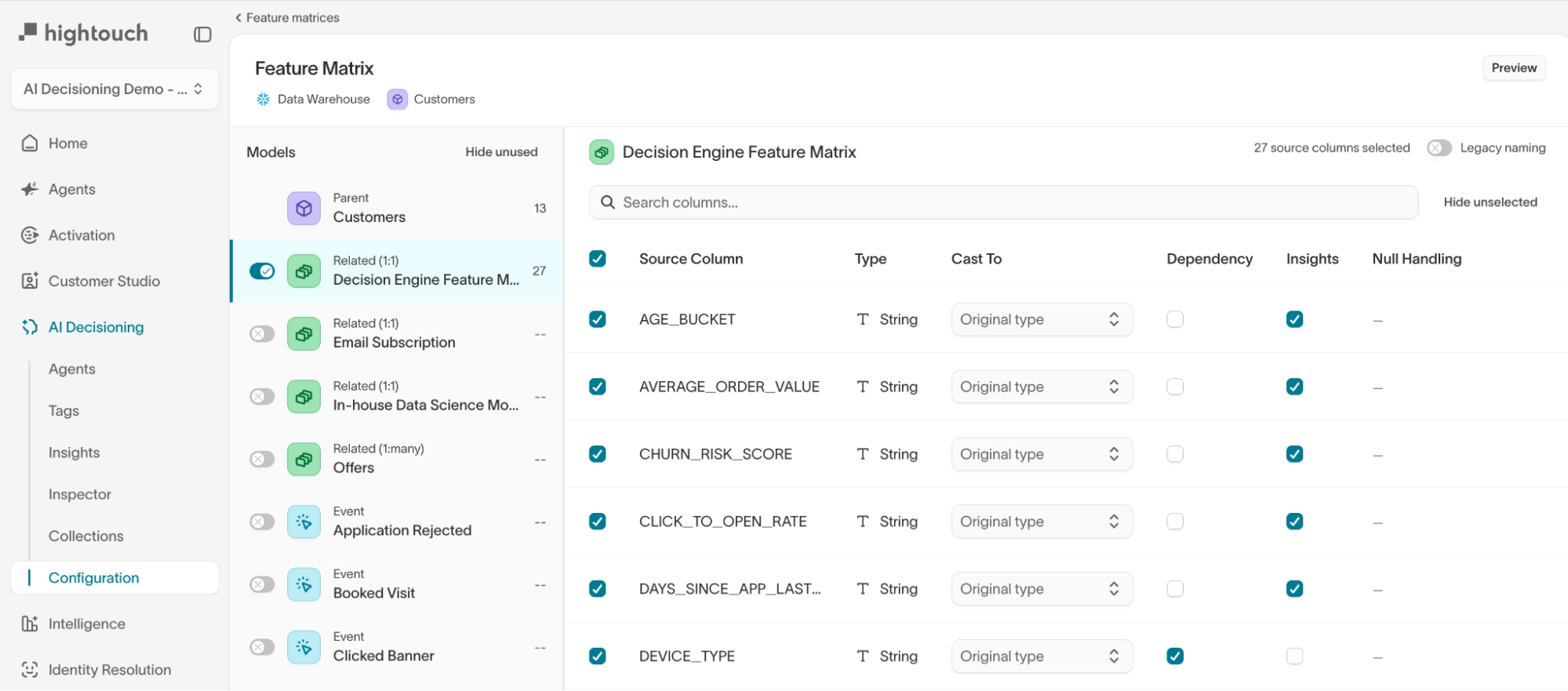
Each column in the builder has the following settings:
| Setting | What it controls |
|---|---|
| Type | The column's data type, detected automatically from your warehouse |
| Cast To | Override the detected type. Available types: String, Number, Big Integer, Boolean, Timestamp, Date, Unix Timestamp |
| Dependency | When checked, passes the column through for insights and analysis without using it as a model input. Use for identifier columns or features you want to analyze against but not train on |
| Insights | When checked, includes the column in AID's performance insights to explain why certain messages perform better for certain users. Capped at 50 columns |
| Null Handling | Controls how missing values are treated during model training |
For event models and one-to-many related models, additional settings appear:
| Setting | What it controls |
|---|---|
| Aggregation | How the model summarizes multiple rows per user (see table below) |
| Time Windows | The lookback period for the aggregation (for example, 7d, 30d, 90d) |
| Filter | Narrows the rows included in the aggregation (for example, channel = 'email') |
Available aggregations:
| Aggregation | What it does | Example |
|---|---|---|
| count | Number of occurrences | Total purchases |
| sum | Total value | Total revenue |
| avg | Mean value | Average order value |
| min / max | Extreme values | Smallest or largest order |
| mode | Most common value | Most-used payment method |
| first / last | Earliest or most recent | First purchase date |
| count distinct | Unique value count | Unique products purchased |
Each time window you select generates an independent column. For example, selecting count with 7d and 30d produces purchases_count_7d and purchases_count_30d. Available windows: All Time, 7d, 14d, 21d, 30d, 60d, 90d, 180d, 365d.
Use the Filter setting on event models to create specialized variants. For
example, filter email events by channel = 'email' to get email-specific
counts separate from push or SMS.
Step 3: Preview
Select Preview before saving. A preview drawer opens with two tabs: Features shows every generated output column, and SQL shows the generated query so you can run it live against your warehouse to verify results. No SQL knowledge is required to use the builder, but the SQL tab is useful if you want to inspect or debug the underlying query.
Step 4: Save and attach to an agent
- Select Save in the Feature Matrix Builder.
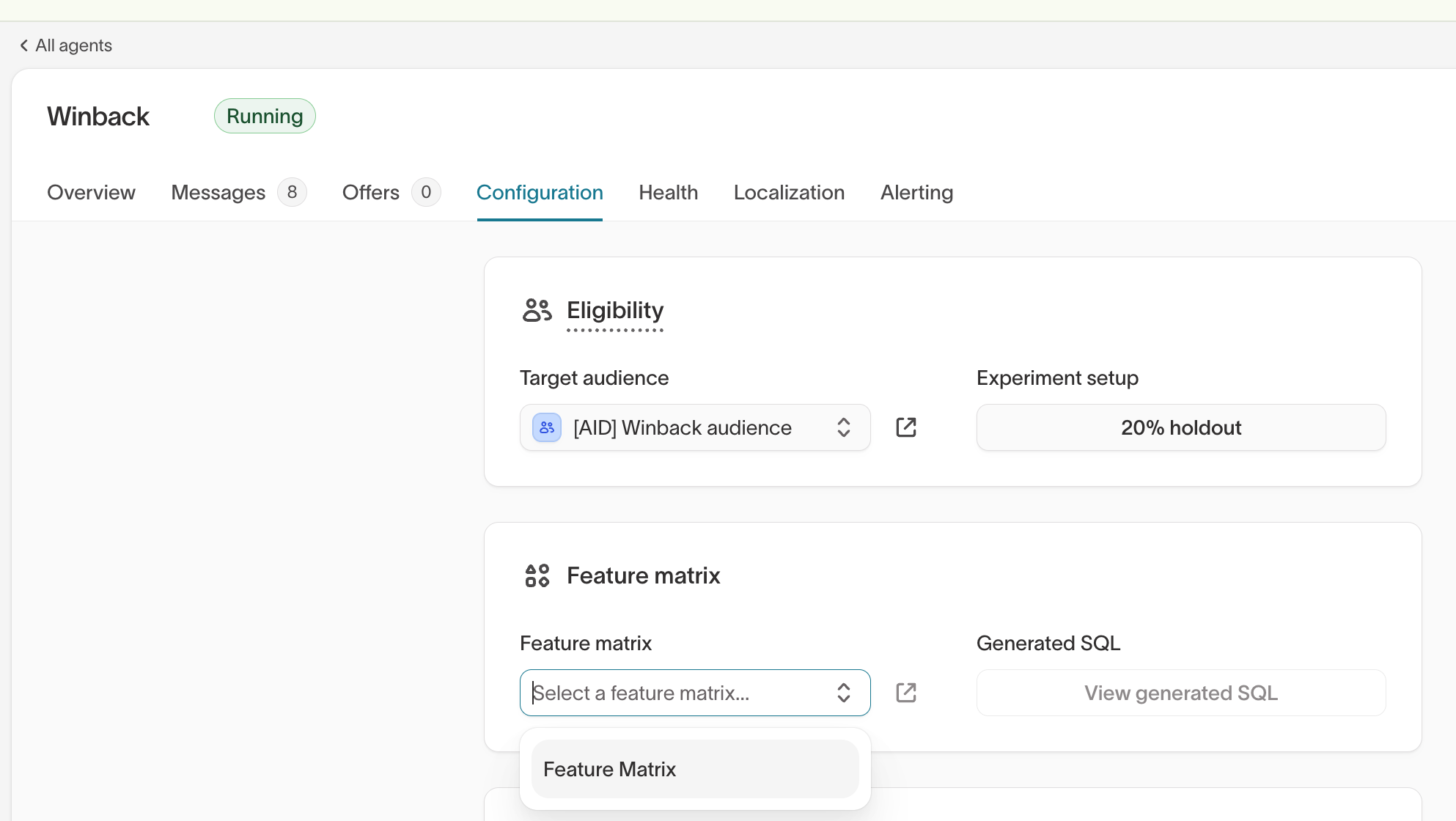
- Go to AI Decisioning > Agents and select the agent you want to use the matrix with.
- Open the agent's Configuration tab and scroll to the Feature matrix section.
- Select your feature matrix from the dropdown and save.
The agent will use the attached matrix for model training and personalization immediately.
Share a feature matrix across agents
A feature matrix can be attached to any agent within the same AID engine. Use a single shared feature matrix when most agents need the same core view of the user. This keeps setup simple and ensures consistent signals across agents.
Create agent-specific matrices when different use cases need genuinely different user views — for example, an onboarding agent vs. a re-engagement agent. Duplicate the default matrix, tailor the columns, and attach each to its corresponding agent.
The main tradeoff with a large shared matrix is compute: the AID engine recalculates all UFM features daily for every eligible user. If many features are irrelevant for some agents, agent-specific matrices are more efficient. AID models will discount low-signal features naturally, so a slightly oversized shared matrix is often fine to start.
Manage schema changes
If a column is removed from your warehouse schema but still referenced in the feature matrix, it will appear with a Removed label and italicized name in the UI. This is intentional — AID surfaces the error rather than silently dropping the column.
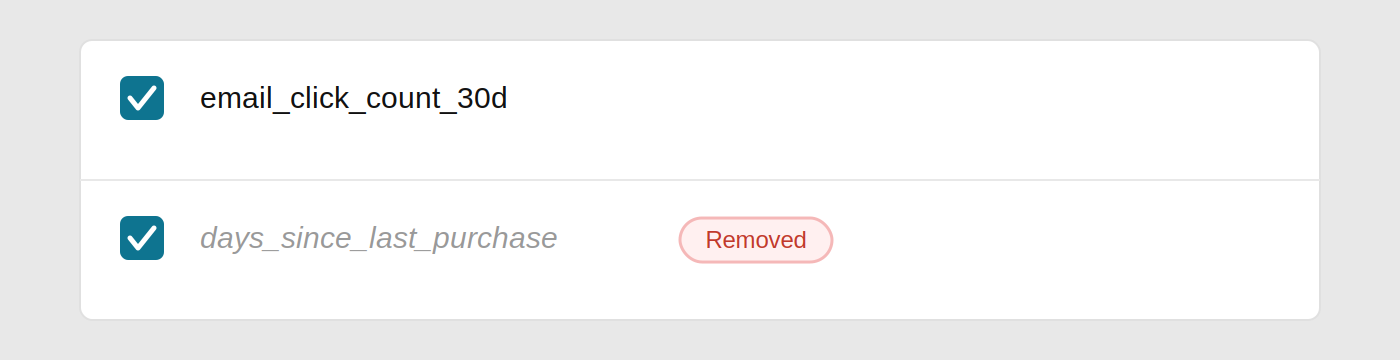
If a removed column is left selected, the scheduled run that generates messages for your agents will fail. You must either restore the column in your schema or deselect it in the feature matrix before the next run.
When looking for the column, make sure you are in the correct model. The column will only appear under the data source it was originally added from.
Recommended order of operations for schema changes
- Remove the column from the feature matrix and save.
- Then make the schema change in your warehouse.
If the schema is changed first, AID will flag the error and the run will pause until the feature matrix is updated.
When new columns are added to your source data, the builder discovers them automatically the next time you open the matrix editor. Select the new columns and save to start using them.
Choose high-signal features
The most effective feature matrices span five categories:
| Category | What it captures | Examples |
|---|---|---|
| Behavioral history | What customers have done | days_since_last_purchase, total_purchases_90d, email_click_count_30d, last_date_email_click, app_sessions_last_week, most_engaged_day_of_week, cart_abandonment_count, most_purchased_category, purchase_time_of_day |
| Demographic and firmographic | Who the customer is | age_range, gender, account_type, country, state, timezone, urban_vs_rural, primary_device_type, operating_system |
| Customer value and lifecycle | Where they are in the journey | total_revenue, avg_order_value, months_as_customer, days_since_signup, subscription_tier, months_until_renewal, in_last_month_of_contract, engagement_decline_30d, product_usage_frequency |
| Preference and engagement | How they respond to outreach | email_response_%, push_response_%, email_click_count_30d, push_click_count_30d, preferred_contact_method, discount_redemption_rate, responds_to_urgency, favorite_product_categories |
| Current context | Their situation right now | current_plan, devices_owned, contract_end_date, eligible_for_upgrade, browsed_last_24hrs, recent_search_terms, payment_method_expiring, billing_issues |
Why each category matters:
- Behavioral history is typically the strongest predictor of future behavior. These features reveal customer preferences and intent.
- Demographic and firmographic features interact powerfully with behavioral data to create nuanced segments, even though they are less predictive on their own.
- Customer value and lifecycle features help the model understand loyalty, price sensitivity, and which interventions are appropriate at each stage.
- Preference and engagement features directly inform which messages and channels will resonate with each individual.
- Current context features enable timely, contextually relevant outreach that meets customers where they are right now.
Example: E-commerce feature matrix
Here's what a practical feature matrix might look like for a retail brand:
| Feature category | Example features |
|---|---|
| Purchase history | total_orders, avg_order_value, days_since_last_order, returns_rate, favorite_category |
| Engagement | email_open_rate_30d, cart_abandonment_count, wishlist_items, website_visits_14d |
| Customer value | lifetime_revenue, months_as_customer, predicted_ltv, loyalty_tier |
| Preferences | preferred_brand, mobile_vs_desktop, price_sensitivity_score, responds_to_sales |
| Current state | cart_value, items_in_cart, days_since_cart_update, browsed_categories_today |
Feature engineering best practices
Start with what you have. You don't need perfect data to begin. Start with basic behavioral events (purchases, logins, page views), demographic information from your CRM, and engagement history from your marketing platforms.
Turn raw events into features. Raw event logs need to be aggregated into meaningful features. The Feature Matrix Builder handles this automatically when you configure aggregation types and time windows. For example, raw email_click events become email_clicks_last_7_days, email_clicks_last_30_days, and days_since_last_email_click.
More features are better than fewer. AID models can handle hundreds of features and will automatically determine which ones matter most. If a particular feature ends up not predicting customer behavior, the model will learn to ignore it.
Next steps
- Smart suppression to optimize send volume.
- Insights to review agent performance.
- Configuration to configure AI Decisioning settings.