Overview
This page walks through how marketers work in Hightouch — from building your first audience to measuring campaign results. Each section covers one step in the workflow. You can adopt them independently, but they work best together.
Everything here runs on warehouse data that your data team has already prepared. For the data infrastructure underneath, see How data activation works.
Explore the interactive architecture diagram
See how data flows and where each product fits in your stack.
Build audiences
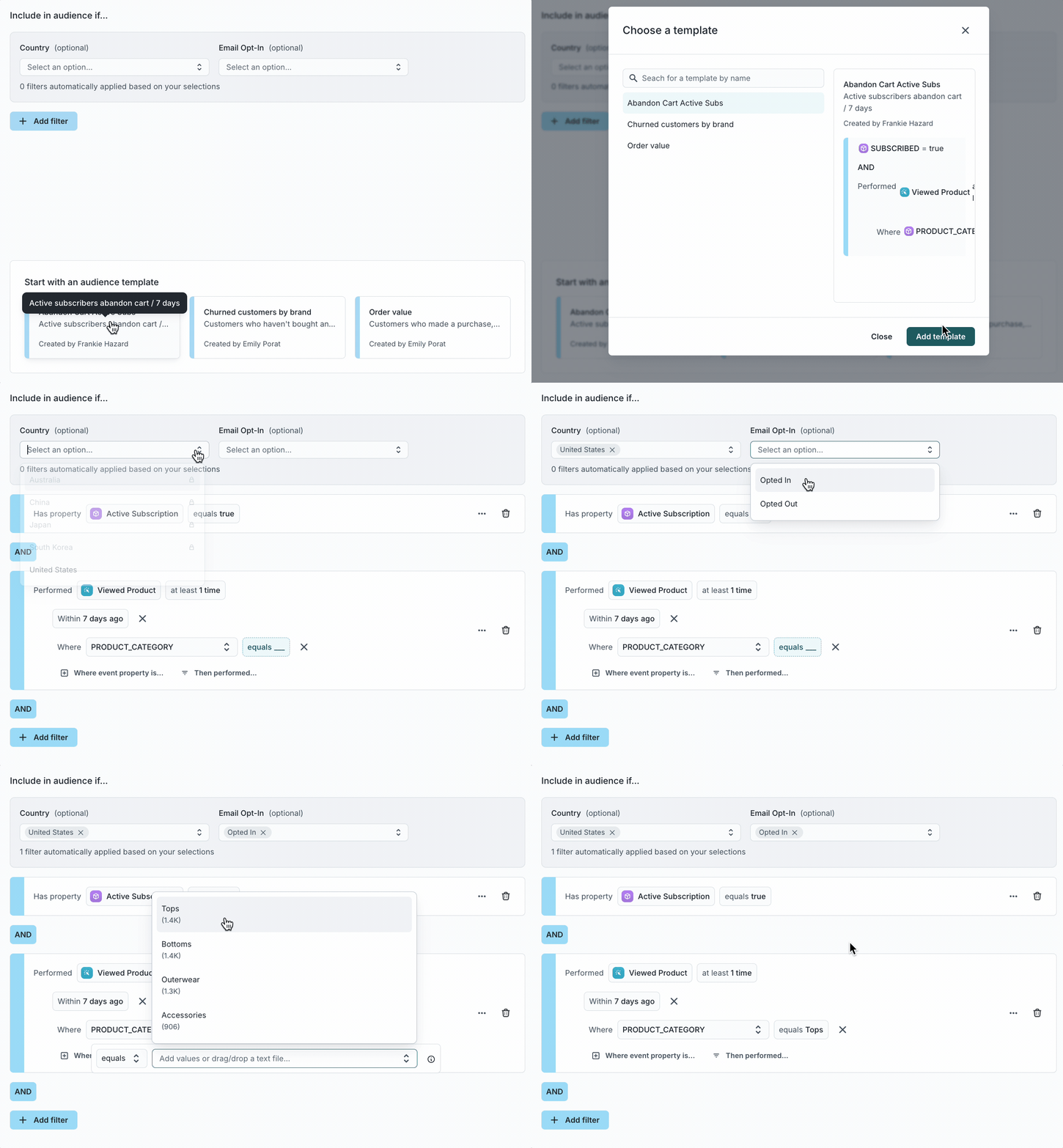
Customer Studio is where you define who to target. The audience builder lets you combine traits, events, and relationships in a visual interface — no SQL required.
You can define conditions like "purchased in the last 30 days" or "viewed a product but didn’t check out," preview audience size and membership before syncing, and create calculated traits like lifetime value or days since last purchase. Audiences stay current as your data changes and sync automatically to your connected destinations.
Example: Target users who viewed a product but didn’t complete checkout.
One audience can power multiple syncs to different tools — the same "high-value customers" segment can feed a Braze campaign, a Meta lookalike audience, and a Salesforce list.
Explore data with agents
Agents let you ask questions about your customer data and marketing performance in natural language. Instead of writing SQL or filing a ticket with your data team, you describe what you want to know and the agent returns answers grounded in your warehouse data.
You can explore customer segments and trends conversationally, analyze campaign performance across channels, and save prompts as recurring reports that run on a schedule. Agents draw on the same warehouse data that powers your audiences, so you can build an audience visually and then use an agent to analyze its performance or compare it against other segments.
Orchestrate journeys
Journeys automate multi-step campaigns across channels. You define the entry criteria, add steps like emails, SMS, or webhook calls, set time delays and branching conditions, and Hightouch handles the execution.
Example: A customer abandons checkout → wait 2 hours → send a reminder email → if no purchase after 24 hours → send an SMS with a discount code.
Journeys support holdout groups for measurement, re-entry rules, and branching based on customer behavior or attributes.
Optimize with AI Decisioning
AI Decisioning uses reinforcement learning to recommend the best message, channel, and timing for each customer. Rather than manually creating rules for every scenario, you define the goal and AI Decisioning learns what works over time.
It optimizes across message content, send channel, and timing simultaneously. You can inspect individual decisions to understand why a customer received a specific treatment and measure incremental lift against holdout groups.
AI Decisioning works alongside journeys and audiences — it doesn’t replace your campaign logic, it makes each touchpoint more effective.
Draft ad creatives
Ad Studio helps you draft and refine ad creatives for paid channels. You provide brand assets and guidelines, and the AI generates variations that follow them. You review, edit, and export the final creatives to your ad platforms.
Measure results
Intelligence provides measurement tools so you can understand what’s working and what isn’t.
Splits divide audiences into test and control groups to measure the incremental impact of a campaign. Holdouts withhold a portion of an audience to establish a baseline. Dashboards track campaign metrics over time and let you drill into performance by audience, treatment, or trait.
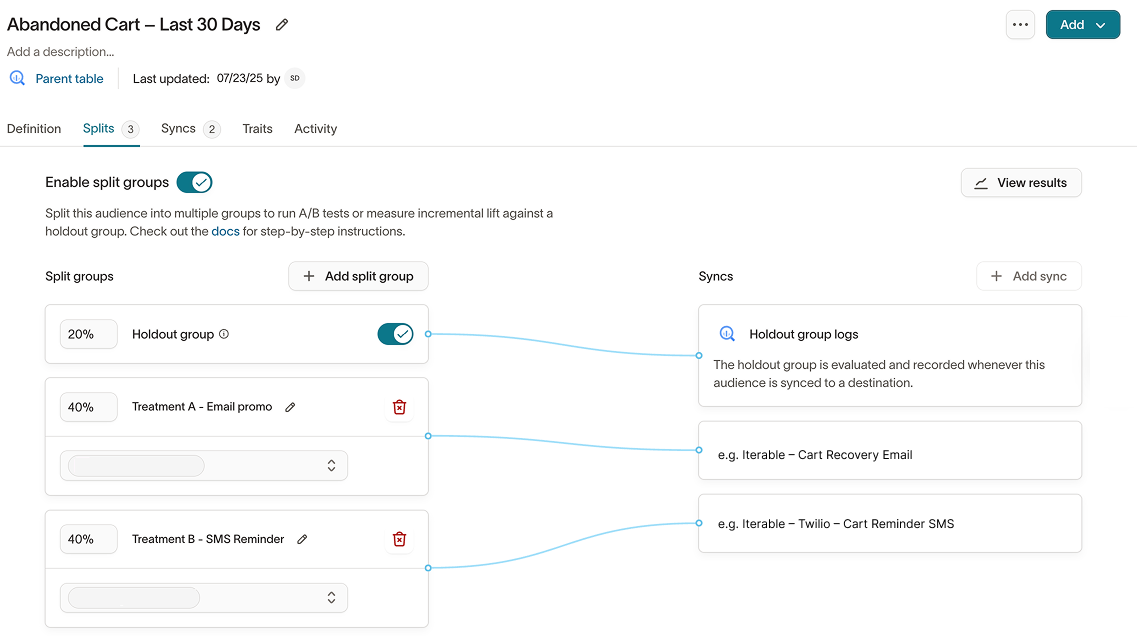
Results write back to your warehouse, so your data team can include them in broader reporting and analysis.
How it connects
The marketing workflow in Hightouch follows a natural sequence, but each tool works independently.
- Your data team connects a source and sets up the schema
- You build audiences in Customer Studio
- Agents help you explore data and find opportunities
- Journeys automate multi-step campaigns
- AI Decisioning optimizes message, channel, and timing per customer
- Intelligence measures what worked
Next steps
- Build your first audience
- Set up a journey
- Explore AI Decisioning
- Learn how data activation works — the technical foundations underneath everything in Hightouch