Overview
A violation occurs when an event sent through an event source does not satisfy the contract applied to that source.
Violations help you identify incomplete, inconsistent, or unexpected event data before it impacts downstream tools.
Domains match events exactly. The event name, field names, and field types in an incoming event must match the schema as written, including capitalization and spaces. A domain schema is a precise rule for the event data, not a loose set of naming guidelines.
Events can cause three types of violations:
- An undeclared event violation occurs when a specific event is not
specified in any domain applied to the source
- e.g.
Button Clickedevent is sent to Hightouch, but it is not in the E-commerce Events domain
- e.g.
- An undeclared field violation occurs when a field in an event is not
specified in the validation schema
- e.g.
user_namefield is sent to Hightouch in theOrder Completedpayload, but it is not specified in the validation schema
- e.g.
- An invalid field violation occurs when a field does not pass the schema
validation defined by JSON Schema rules
- e.g.
userIdis sent as astringwhen the schema defines it as anumber
- e.g.
All violations are written to a separate event_violations table in your
destination, regardless of how violation enforcement is configured.
This table has the schema:
- payload: JSONB
- event_name: string (derived from payload)
- event_type: string (derived from payload)
- schema_version: string (derived from payload)
- has_undeclared_schema: boolean
- has_undeclared_fields: boolean
- has_schema_violation: boolean
- violations: string[]
Violation enforcement
Hightouch allows you to configure how to handle violations at the source and event level. Depending on the cleanliness of your current event tracking, you may want to allow violations to be written to your main event tables.
This table shows how Hightouch can handle each violation type. The bolded actions represent the default behavior.
| Invalid fields | Undeclared field | Undeclared event |
|---|---|---|
| Allow | Allow | Allow |
| Block | Block | Block |
| Filter |
Allow writes the event and records the violation. Block rejects the event. Filter drops only the undeclared fields and writes the rest of the event.
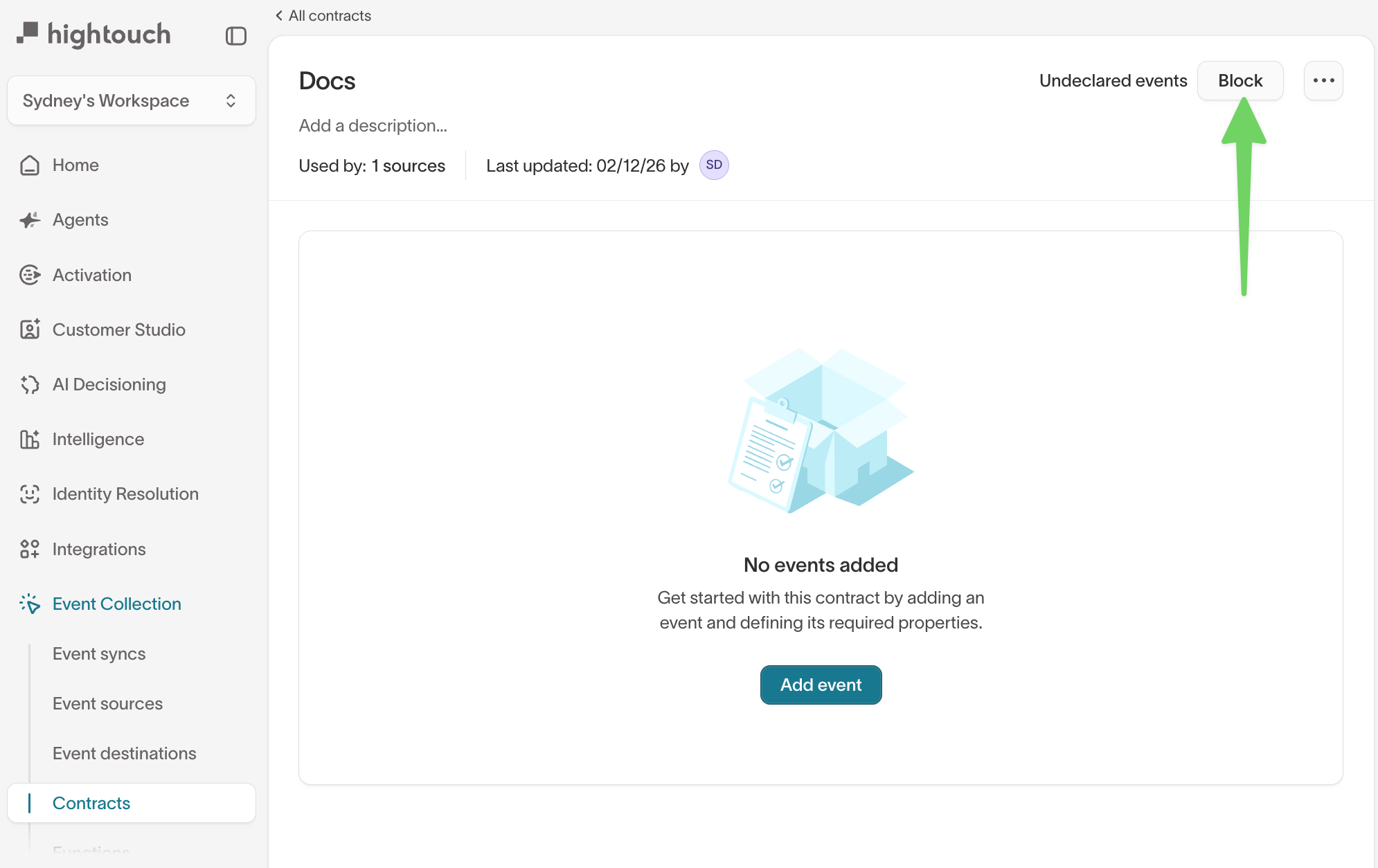
Configure how to handle undeclared events on the source's detail page.
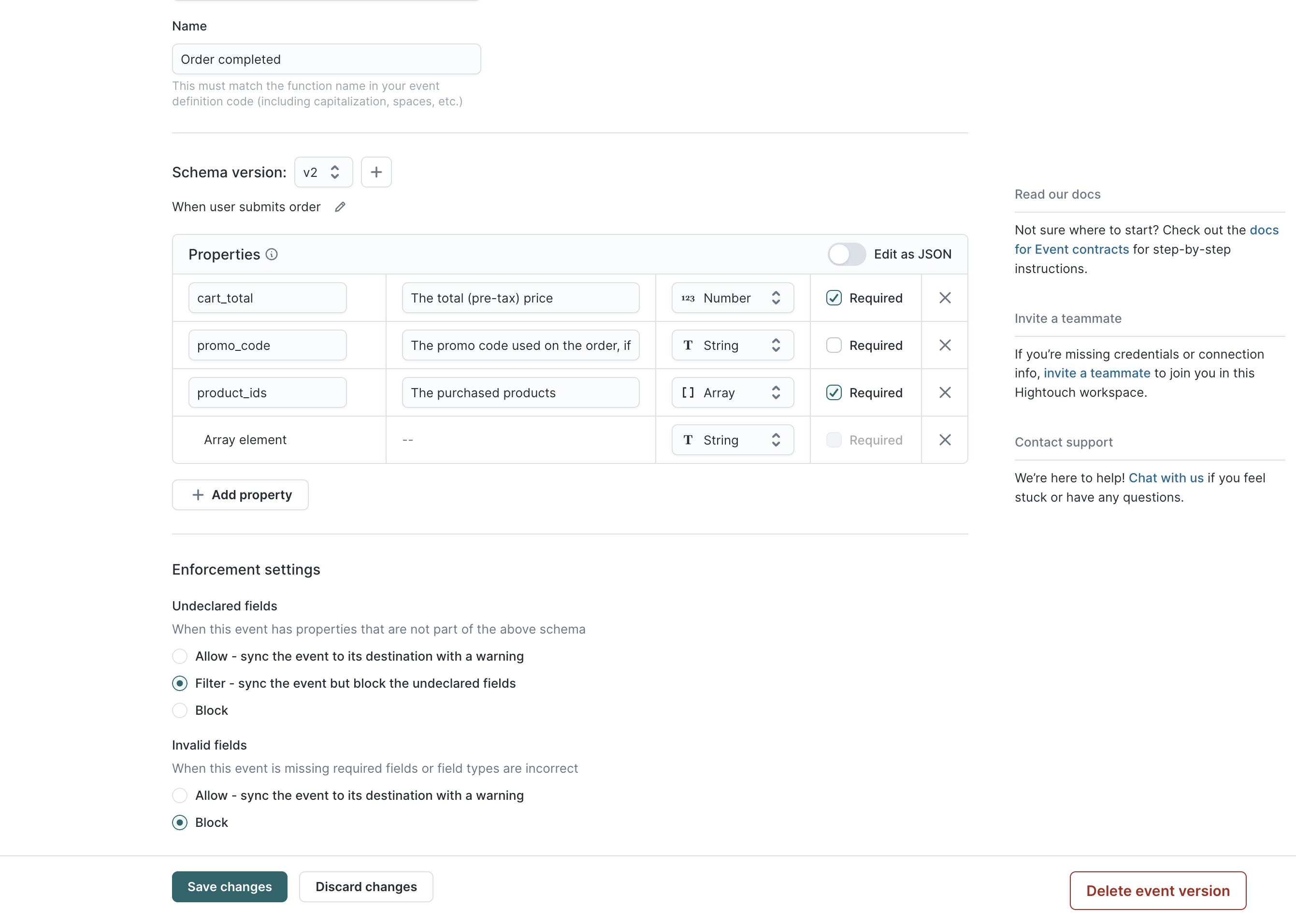
Schema violations and undeclared fields can be configured at an event-level on the event schema page.
Diagnose why an event was blocked or flagged
When an event doesn't arrive the way you expect, it usually maps to one of the three violation types above. Most of the time the cause is a small mismatch between what the SDK sends and what the contract declares, not a missing contract.
Start with the event_violations table or the debugger to see which violation fired, then check the matching cause below.
Event name doesn't match the contract
A small difference between the event name in your tracking code and the event name in the contract registers as an undeclared event. The match is exact, so these all count as different events:
Order Completedandorder completed(capitalization)Order CompletedandOrder Completed(extra space)Order CompletedandOrder Completed(trailing space)
Confirm the event name in your code matches the contract character for character. If you block undeclared events, a mismatch blocks the event.
Fields are in the wrong place
Hightouch validates a field by where it sits in the event, not only by its name. A field that the schema expects under context but the SDK sends under properties registers as an undeclared field in properties, and as a missing field in context. Page and screen metadata are common cases, since some of it belongs in context rather than properties.
Check that each field is in the section the schema declares.
Field type doesn't match
A field sent as the wrong type registers as an invalid field violation. A common case is an identifier sent as a string when the schema defines it as a number, or the reverse. Align the type in your tracking code with the type in the schema.
Every event is blocked or the schema appears empty
If a whole source is blocked, check the domains applied to the source before the events. An empty domain combined with settings that block undeclared events and fields blocks every incoming event, because nothing matches a domain that declares nothing. Confirm the domain has its events and fields defined, then confirm enforcement is set the way you intend.
When undeclared events are blocked and no matching schema exists, the raw violation recorded for the event is Schema not found. You'll see this text in the event_violations table and in the debugger's event detail. The debugger's blocked-state badge shows a different message in its tooltip — Undeclared events are blocked in your contracts settings — which explains the enforcement decision rather than the raw violation.