| Audience | Marketers |
| Prerequisites |
|
Content Analysis & Suggestions helps you understand how your messages relate to each other, why certain content performs, and where you can improve your creative library. It builds on your tag framework and provides insights to guide ongoing content planning.
Overview
Content Analysis & Suggestions helps you understand why some messages perform better than others. Instead of only seeing which message won, it highlights the elements—such as tone, structure, or value proposition—that influenced performance.
Inside each message, Content Analysis shows whether your content is unique before activating an agent. After your messages start running, the weekly Summary report in Insights helps you decide when to add new content, refresh existing messages, or retire content that's no longer effective.
Together, these tools help you understand what's working, avoid unintended duplication, and plan what to create next.
Before you start
Complete these steps before using Content Analysis & Suggestions:
-
Create a message.
Build or update message content inside an agent.
See: Add and manage messages -
Add or refine tags.
Apply message and variant tags to describe key attributes such as tone, value proposition, or offer.
See: AID Tags
Content Analysis depends on your tags
Content Analysis uses your message and variant tags to understand tone, structure, and strategic intent.
Consistent tagging helps the system:
- Identify similar messages
- Detect overlap or redundancy
- Surface content gaps
- Provide more accurate recommendations
How to use Content Analysis & Suggestions
Follow this workflow to evaluate and improve your content over time:
-
Review Content Analysis before launch.
In the message'sContenttab, check whether the message is unique and not unintentionally duplicating other messages in your library. -
Activate your agent.
When your content looks distinct, enable the agent so your messages begin generating performance data. -
Review the weekly Summary report.
InInsights > Summary, check for declining engagement, content gaps, or recommended improvements. -
Use Agents to explore insights.
From the Summary tab, ask follow-up questions—such as “Why is this message similar to others?” or
“Which tones performed best this week?”—to understand results in plain language. -
Update or create new content.
Refresh, retire, or expand content based on the insights and recommendations you discover.
Review message uniqueness before launch
Content Analysis summarizes the creative attributes of a message and shows how it relates to other messages in your content library.
View Content Analysis inside a message
Navigate to:
AI Decisioning > Agents > Select an agent > Messages > Select a message > Content
You'll see:
Tag summary
All manual and AI-generated tags applied to the message.
Similarity analysis
Messages with similar tone, structure, framing, value proposition, or language patterns.
Expand each item to see why the messages match.
Each related message is prefixed with a similarity status and a colored dot showing how close it is to the current message:
- Different from — introduces new strategic or creative value
- Similar to — overlaps with existing content
- Very similar to — potentially redundant or interchangeable
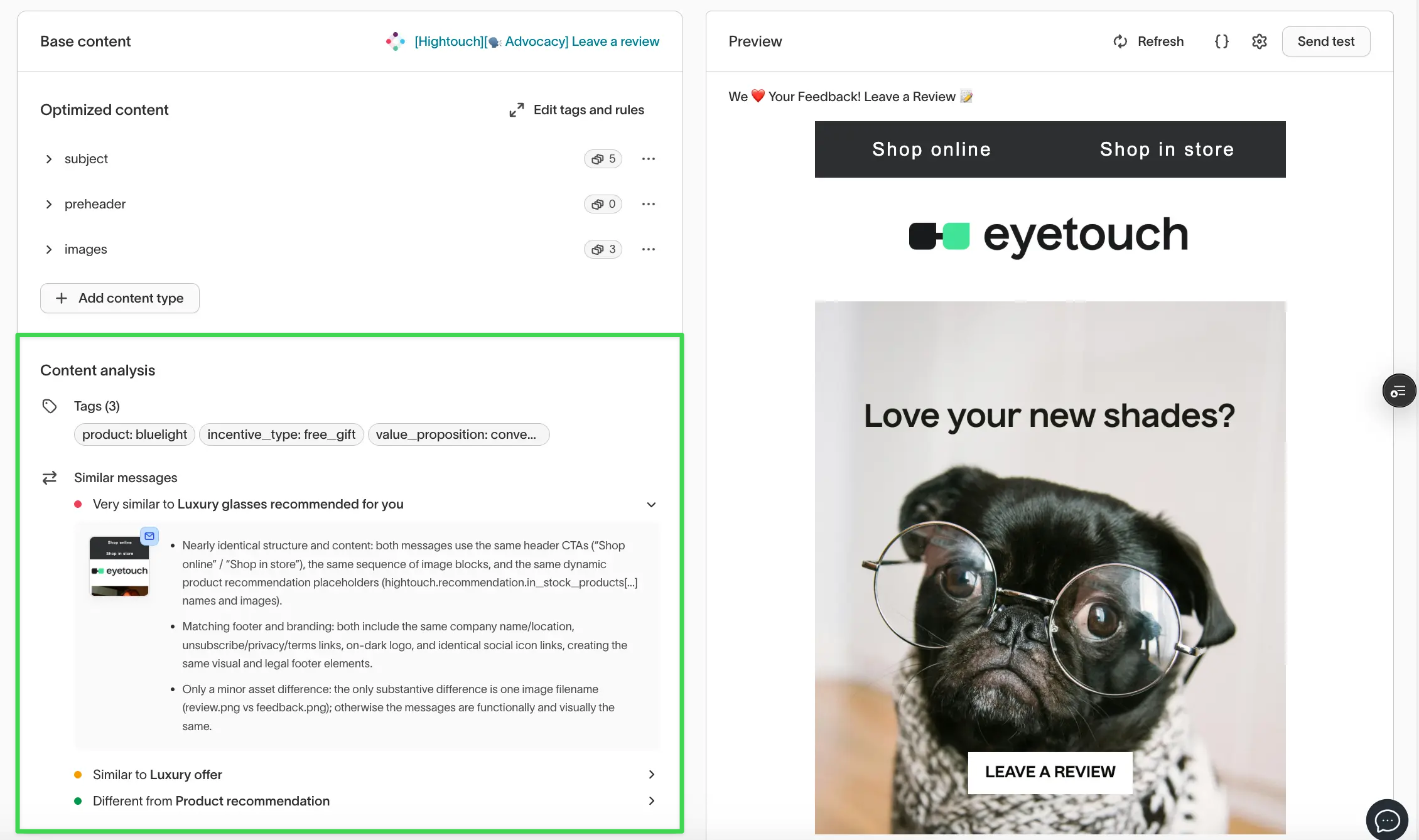
Use Content Analysis before activating an agent to confirm each message adds something unique.
Interpret the weekly Summary report
Weekly suggestions appear in the Summary view of Insights:
AI Decisioning > Insights > Summary
The Summary tab appears only when the agent has a scheduled report.
You can review this report during weekly planning to decide what to adjust or create next.
The report includes:
Performance highlights
Overall trends across themes, tones, or formats.
Content gaps
Areas where your content library lacks variety.
Content to refresh
Messages that are declining in engagement.
Recommended actions
Suggestions such as:
- Refreshing visuals or copy
- Adding a new variant
- Retiring a low-differentiation message
- Expanding topics that perform well
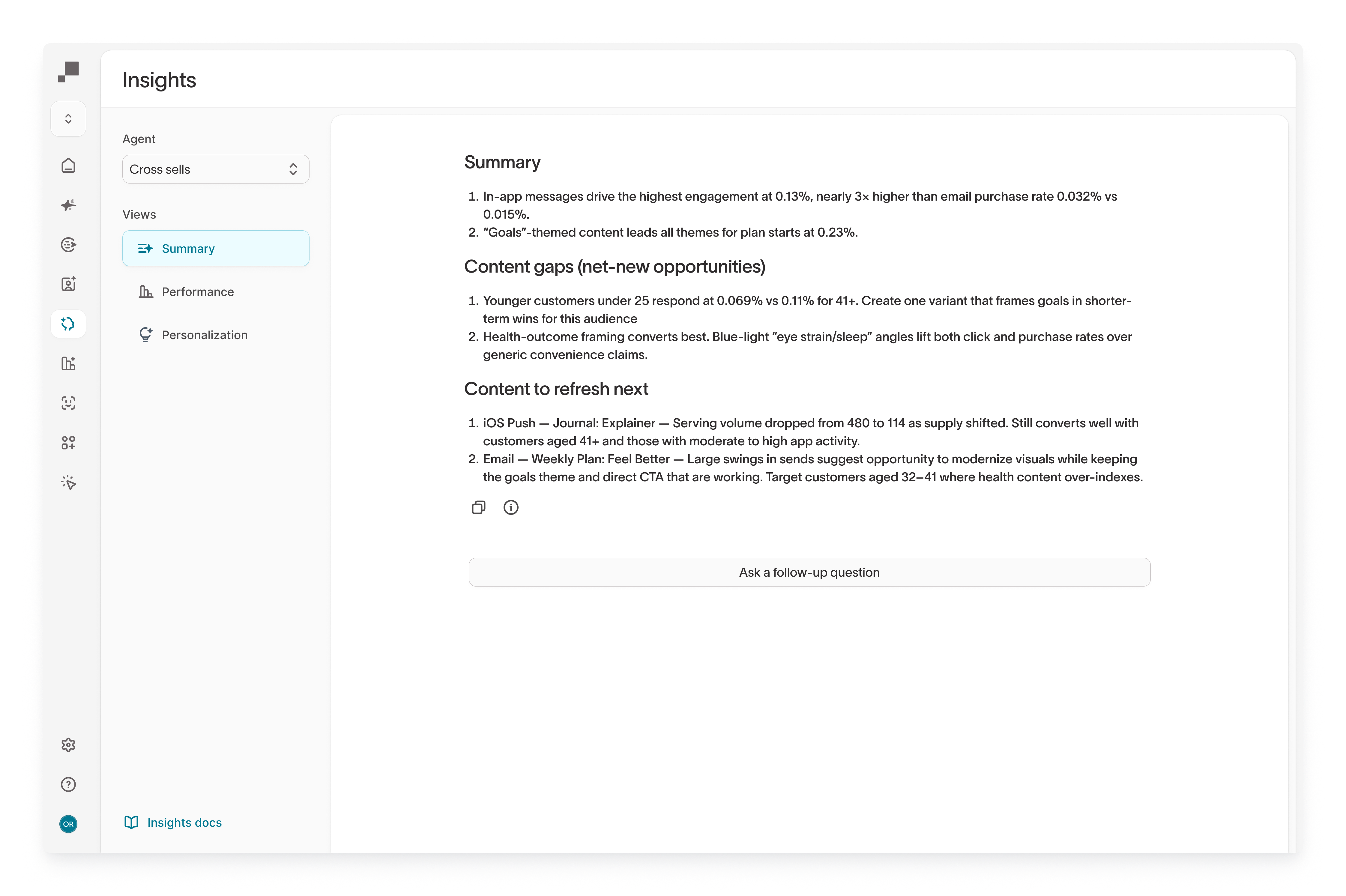
The Summary report refreshes automatically each week based on updated performance data.
Ask follow-up questions with Hightouch Agents
From the Summary tab, select Start a new chat about this report to open the report in Agents, then ask follow-up questions in plain language from the chat.
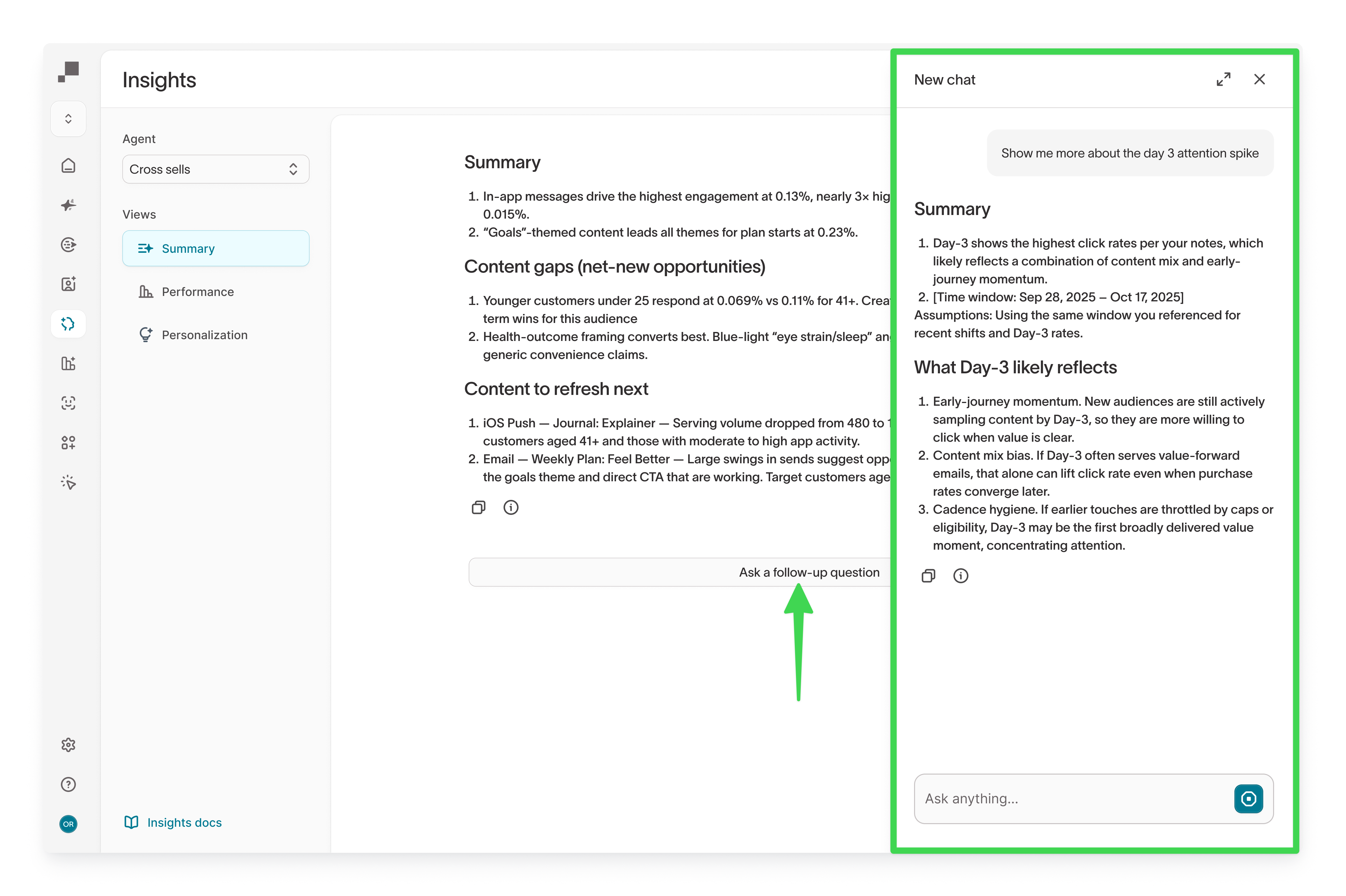
You can ask:
- “Why is this message similar to others?”
- “Which motivators performed best last month?”
- “Where are our biggest content gaps?”
- “What themes should we prioritize next?”
Learn more Agents overview
Use Agents to validate ideas or explore trends as you build your next set of content variants.
Troubleshooting
| Issue | Likely cause | Resolution |
|---|---|---|
| Similarity analysis not appearing | Message is new or missing tags | Add or refine tags |
| Weekly report missing | Summary not configured | |
| Recommendations feel too general | Limited content variety or inconsistent tag usage | Refine tags or add more content |
| Fatigue insights unavailable | Not enough message sends | Allow more time for performance data to accumulate |
The Summary report relies on recent performance. Newly created messages may need time before insights appear.
Next steps
- AID Tags to build the tag framework Content Analysis relies on.
- QA guide to validate messages before launch.
- Hightouch Agents overview to explore insights in plain language.
- AID Insights to see where the weekly Summary report appears.
- AID Agents to create and manage the messages you analyze.