Audience: Data and analytics engineers should collaborate closely with business stakeholders to identify the data required for AI Decisioning use cases.
Prerequisite: Configuration
Overview
Before creating agents, you'll need to prepare the data that AID will learn from. This setup ensures that your AI agents have the full picture: who users are, what they've done, and how they've responded to marketing. That data is then used to both personalize decisions and measure impact. This includes:
- Defining the user populations your agents will target (parent models)
- Enriching them with related data to give user-level context (related models)
- Creating event models that reflect the outcomes you want to optimize.
- Building an audience to feed into each agent so it knows which users to target.
AID uses your data to:
- Engineer user features: Create an understanding of each individual user and detect patterns in behavior across characteristics, traits, events, and responses
- Train and evaluate models: Identify which behaviors lead to outcomes like purchases or sign-ups
Learn more about what we do with this data: Security
Once your data is structured correctly, you can reuse these models across all of your lifecycle motions that are powered by AID.
1. Define your parent models
Purpose: Establish the user populations your AID agents will target
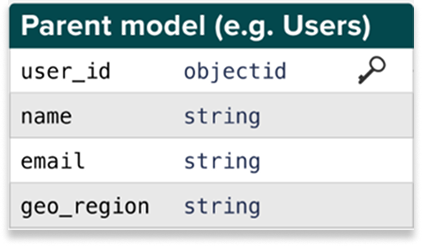
A parent model is your list of users for a given entity type. Each agent selects its own parent model when it's created, so you can run different agents against different populations — for example, one agent targeting individual users and another targeting accounts or households.
All agents in the same decision engine must use parent models from the same data source (warehouse connection). Define your parent models in Customer Studio > Schema.
Requirements:
- One row per user
- A unique identifier (for example,
user_id) as each user's primary key - Basic user data that can include:
- Personal: First Name, Last Name, Full Name, Gender, Date of Birth, Age, Email
- Location & timezone: City, State/Province, Country, Timezone (UTC Offset or IANA Timezone String)
- Account details: Signup Date, Last Login Date, Account Status, Language preferences, Device type, Operating system
- Demographics: Income Bracket, Education Level, Occupation, Marital Status, Number of Dependents
Example model:
Learn more: Parent models
2. Add related models
Purpose: Enrich users with attributes that help the model learn
Related models enrich a parent model with extra context the AI can learn from when making predictions, such as voluntary information, opt-in status, or persona data.
These tables must be joined to the relevant parent model using a foreign key, typically user_id.
Table types to include
You'll need the following tables that contain information about:
Required:
- Consent flags for email, SMS, push, in-app
Recommended:
- User context data from rewards program membership and participation, purchase history and frequency, customer support interactions, etc.
- Persona voluntary data from quizzes, surveys (for example, user goals, intent), etc.
AID requires up-to-date marketing consent to ensure compliance and prevent false negatives in model feedback.
Learn more: Related models
3. Create event models
Purpose: Supply the actions and outcomes AID will learn from
Event models capture the actions users take—purchases, clicks, visits, and more. These power both model training and optimization. AID requires raw, unfiltered event logs that contain:
- User behavior on-site or in-app
- Engagement with marketing content
- Transactional conversion events
At minimum, your model should be structured as one event instance. For instance, if the goal is to increase subscription orders, each row in the table connected to the event model should reflect one distinct order (one row per user), not a line item in a distinct order (multiple rows per one order per user).
Models must include:
user_idtimestampevent_nameof the campaign goal/outcome (for example,order_completed)- Relevant outcome metadata (for example, purchase value, subscription plan details, etc.)
Table types to include
| Type | Examples | Why it's important |
|---|---|---|
| Conversion events | order_completed, signup | Define AI Decisioning goals |
| Engagement signals | page_view, checkout_started | Predict user intent |
| Campaign events | email_clicked, push_unsubscribed | Train on content efficacy and responses |
Learn more: Event models
To export campaign events such as email sends, opens, and clicks from your email service provider (ESP), see Bring email engagement data into your warehouse.
4. Build audiences in Customer Studio
Purpose: Define who each agent will target
Audiences are created using the models above. Each AID agent targets one audience, which determines who is eligible to receive messages—and who gets held out for lift analysis. Your starting audience should be as broad as possible — if there are certain pockets within that audience that need additional guardrails for consent or compliance, you will be able to configure those filters within the agent at a per-message level.
Hightouch recommends audiences of at least 500K users in order to build enough training data to optimize for reinforcement learning.
Your audience should:
- Include all users AID is allowed to message
- Reflect your lifecycle goal (for example, win-back, onboarding)
- Mirror consent and eligibility filters between Hightouch and your ESP
Example: Win-back campaign audience
- Users who haven't purchased in the past 12 months
- AND opened a message in the past 6 months
- AND have opted into at least one channel
Learn more: Create Audiences
Summary: What data you'll need
| Purpose | Table Type | Examples |
|---|---|---|
| Define user populations | Parent models | users, accounts, households |
| Add traits & permissions | Related models | user_profiles, personas, opt_ins |
| Supply behaviors | Event models | orders, signups, page_views |
| Target users | Audience | Built from the above in Customer Studio |